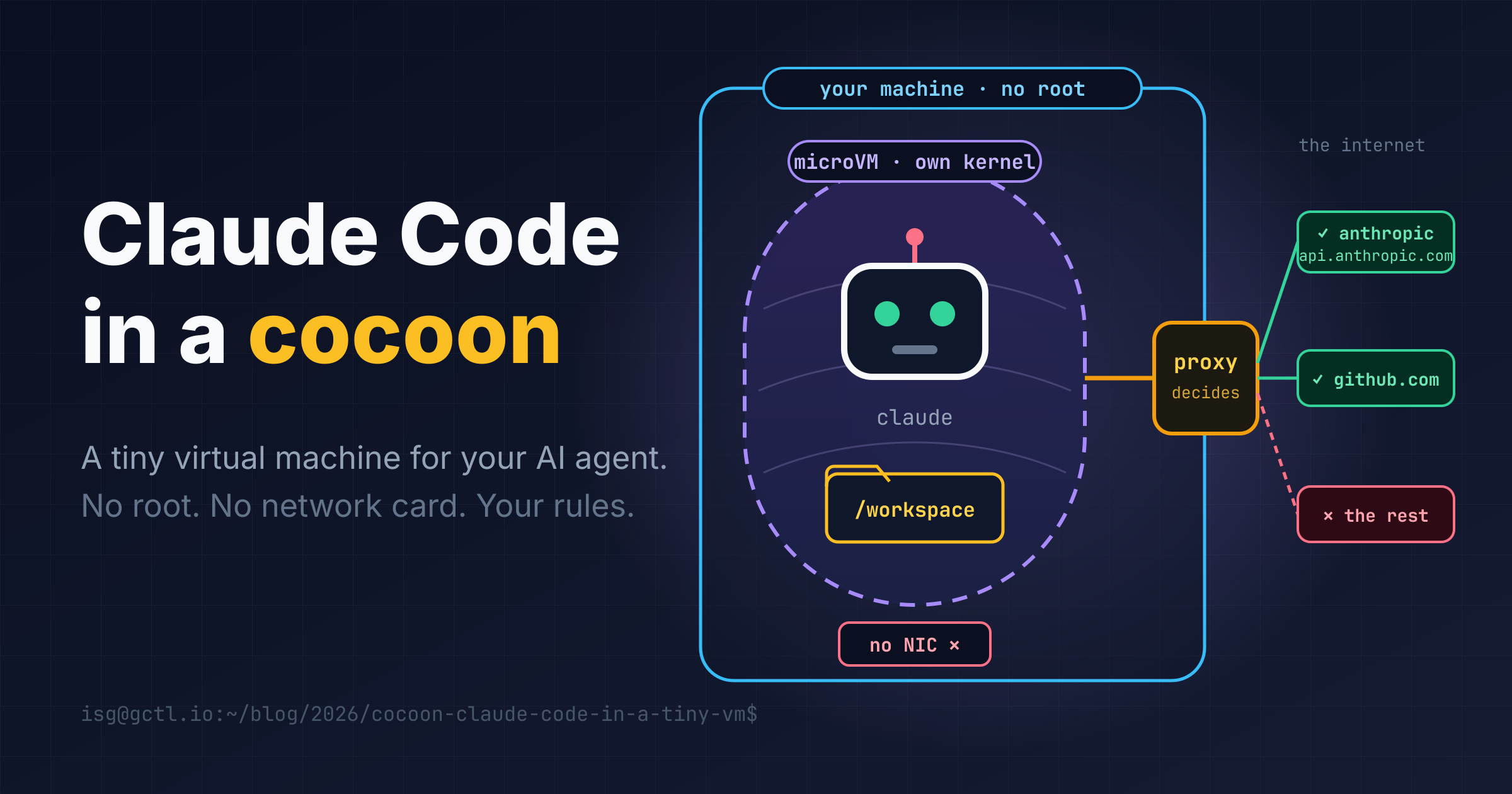
Claude Code is a coding agent. You ask it to fix a bug, and it reads your files, runs shell commands, installs packages and edits your code. That is the whole point of it. It is also exactly what would make you nervous if a stranger did it on your laptop. 😬
So I built cocoon. It runs Claude Code inside a small virtual machine on your own Linux computer. The agent gets a real Linux, real tools and your project folder. It does not get your home directory, your other files, or an open line to the internet.
Here is how it works, with pictures. If you use Linux, you can follow along: I explain each new word as it comes up. Claude Code is made by Anthropic; cocoon is my own project and is not an Anthropic product.
cocoon in a project folder, and you are talking to Claude Code as usual.sudo, nothing installed system-wide. It is one file you download.📖 Words you will meet
/dev/kvm.Claude Code asks permission before it does risky things, and that helps. But a permission prompt is a person getting tired late at night and pressing Enter. I wanted a wall that does not depend on anyone being careful.
You can build walls on Linux in several ways, with containers, seccomp filters, namespaces and so on. I wrote about those in Sandboxing untrusted AI agents on Linux. They all have one thing in common: the code inside still talks to your kernel. If the kernel has a bug, the wall has a hole.
A virtual machine is different. The agent runs on a second kernel, and your real kernel only sees a small, boring set of virtual devices. To get out, you would have to break the VM software, not just trick a program on your system.
The usual objection is “VMs are heavy and slow”. A microVM is not. In my runs, the first program inside the VM started 0.07 seconds after the kernel began booting, and once everything is set up, a VM boots and runs claude --version in about a quarter of a second.
Here is everything in one picture. Read it from the left.
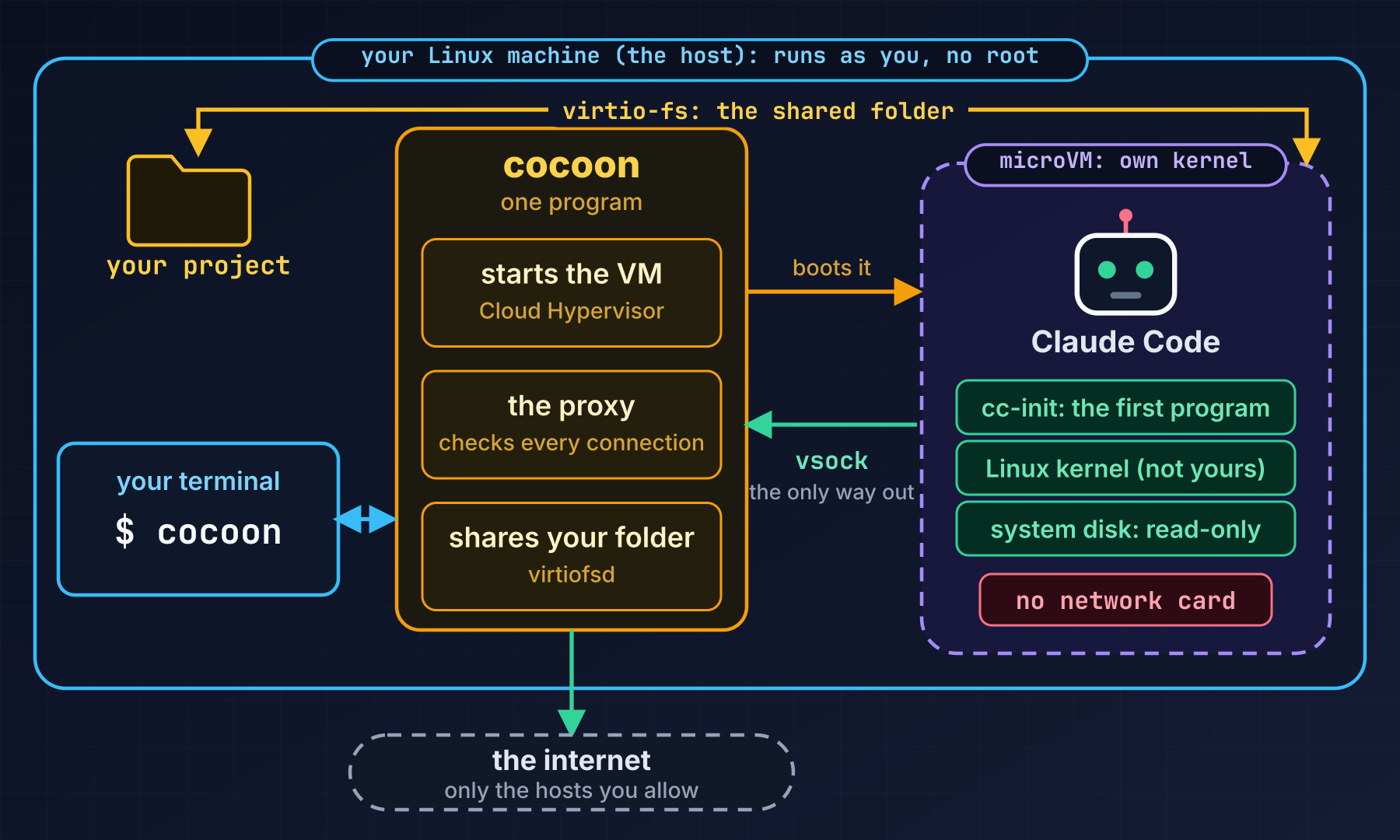
When you type cocoon, this is what happens:
cc-init. There is no long boot process; the kernel already has the drivers it needs built in./exit. The VM powers off, cocoon prints what the agent tried to connect to, and everything temporary is deleted.Inside the VM, the system is a small Alpine Linux with the tools a developer expects: bash, git, gh, ssh, ripgrep, jq, vim, Python, Node.js, a C compiler, Rust, Java and even headless Chromium. Its root disk is read-only, so a session cannot change the system underneath itself. Anything the agent installs lives on a scratch disk that is thrown away at the end.
This is my favourite part. The VM has no network card. There is nothing to configure, firewall or forget about, because the hardware does not exist. A program that tries to open a normal connection simply finds no route.
Claude Code still has to reach its API, though, and it should be able to fetch from GitHub or npm. So there is exactly one door, and it works like this:
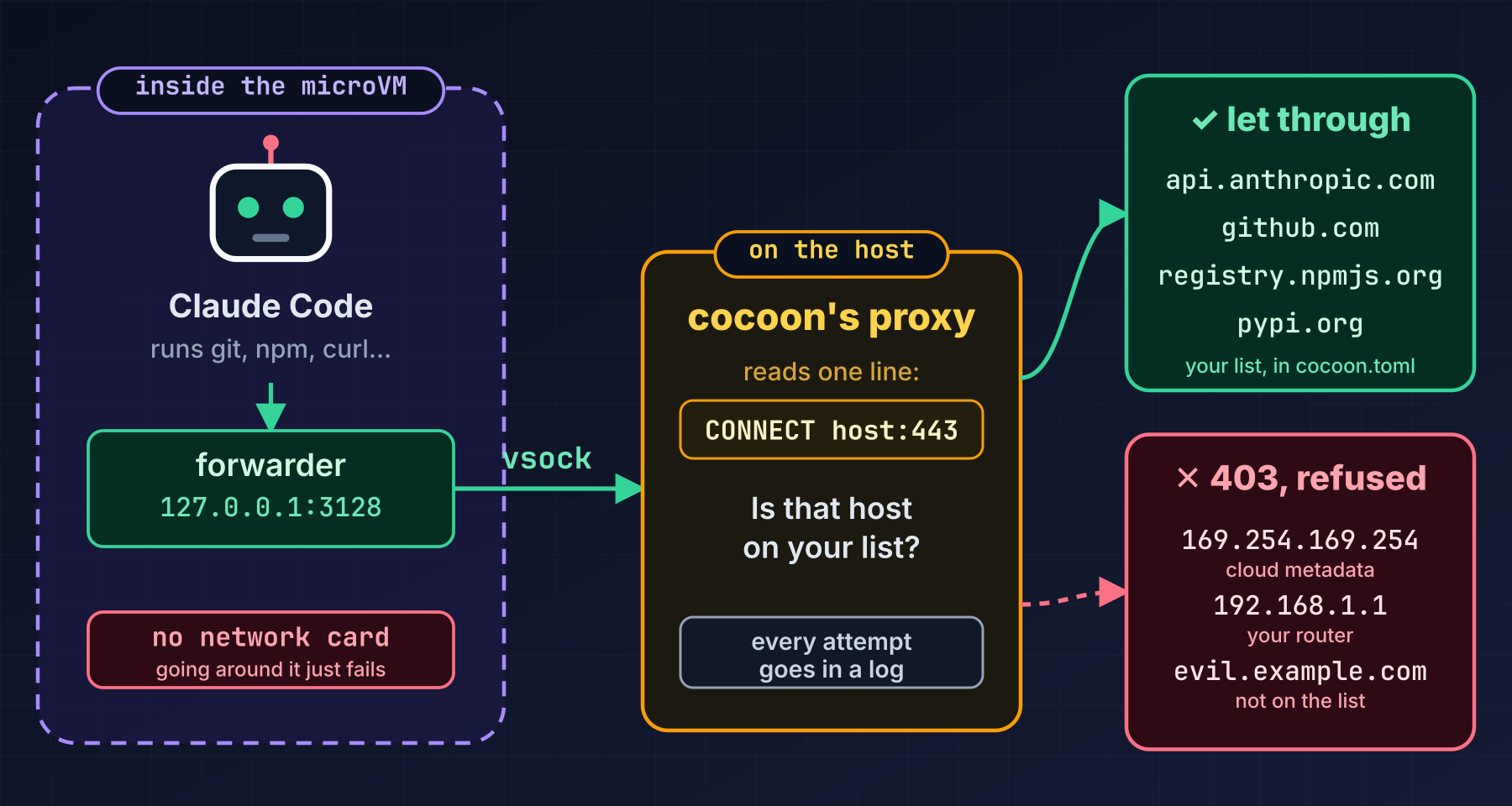
In words:
HTTPS_PROXY setting), so it asks the forwarder inside the VM to open connections for it.CONNECT api.github.com:443, and checks it against the list in your config file. If the host is on the list, it opens the connection and passes the data along. If not, it answers 403, which means “refused”.The default list covers what Claude Code needs to work: Anthropic’s servers, GitHub, npm, PyPI and crates.io. To allow another site, you add one line to the config file. If you want the open internet, allow_all = true allows any public address, but even then your router, your local network and your cloud’s metadata address (169.254.169.254, a place where cloud machines keep secrets) stay blocked.
One honest detail: the proxy sees which host the agent talked to and how many bytes moved, but not what was inside. The data is encrypted from Claude Code to the server, and cocoon does not break that open.
While building cocoon, I ran Claude Code with a deliberately wrong API key, just to see what it connects to on its own. The key was refused, so nothing was done or billed. The proxy log showed the calls to Anthropic that I expected, and one more: a connection to Datadog, a monitoring service. That is ordinary telemetry, the kind of thing most software sends so its makers can see how it is doing. It has nothing to do with your account, and it costs you nothing. Datadog was not on the allowlist, so cocoon declined it, and Claude Code carried on as normal.
There was nothing to fix. It is simply a nice example of what the log is for: it shows you everything your tools reach for, so you can decide what to allow. 👀
The agent needs your code, so cocoon has to get a project folder into the VM. There are two ways, and you pick one with a single line in the config file.
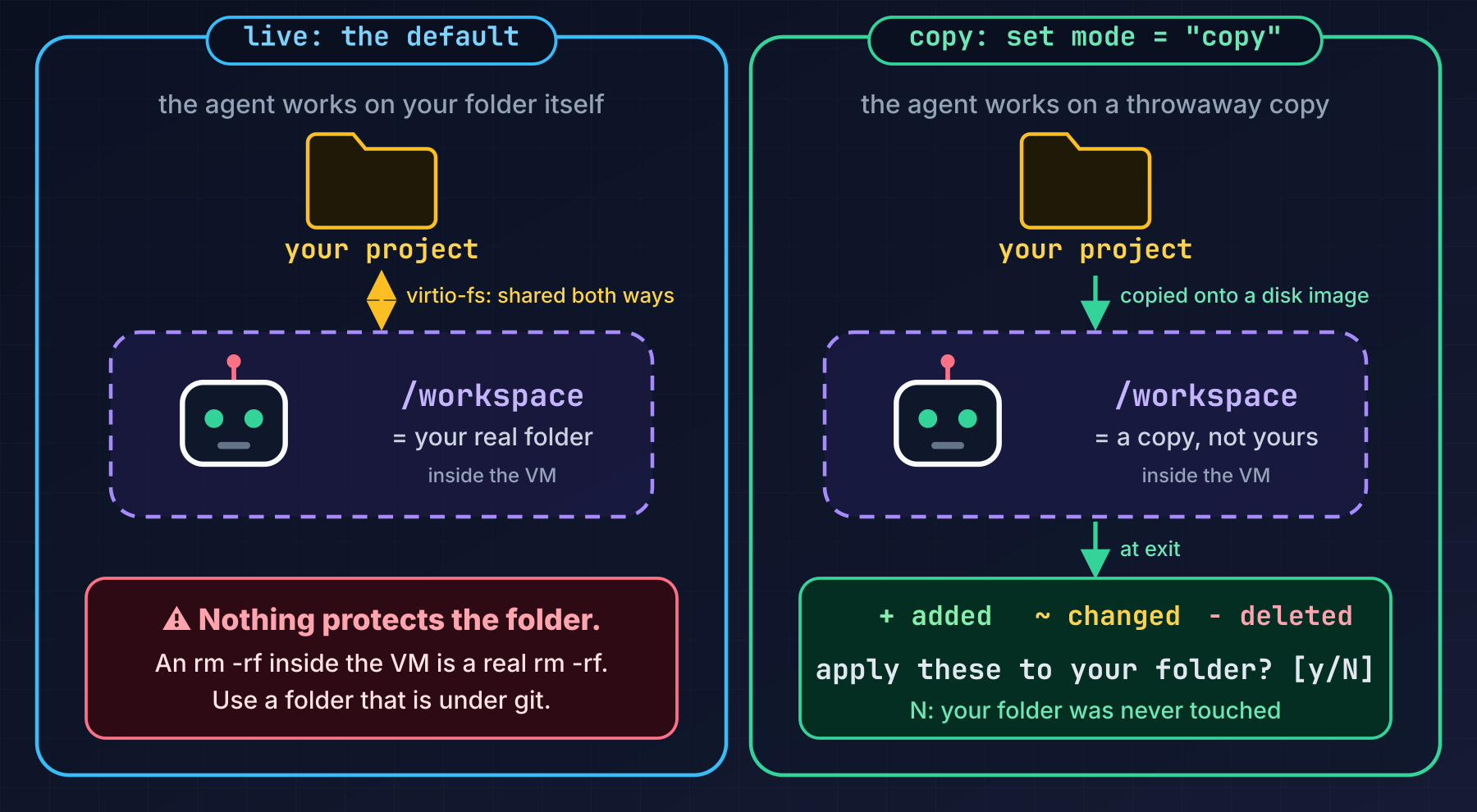
Live mode (the default) shares your real folder with the VM. You and the agent see each other’s edits instantly, so you can keep your editor open while it works. The catch is in the picture: nothing protects the folder. If the agent deletes it, it is gone. Use live mode on a folder that is under version control. It is also slower for folders with huge numbers of small files such as node_modules; it can be three to ten times slower than on a normal disk.
Copy mode is the careful one. The agent works on a throwaway copy. When you quit, cocoon compares three versions of every file (how your folder looked when you started, how it looks now, and what the agent left) and shows you just the agent’s changes:
  workspace changes: 1 added, 1 changed, 1 deleted
    + added.txt
    ~ edit.txt
    - gone.txt
  apply these to /home/alice/code/api? [y/N]
Press y and they are applied. Press N, and your folder was never touched. Files you edited yourself in the meantime are never overwritten, and if you and the agent both changed the same file, it is flagged as a conflict and left alone.
What you need:
| 🐧 Linux on x86_64 | arm64 is not released yet |
| ⚙️ KVM | read and write access to /dev/kvm, usually by being in the kvm group |
| 🧱 e2fsprogs | the mkfs.ext4 and debugfs tools, which nearly every distribution already has |
| 💾 About 4 GB of disk | for the first run |
| 🧠 About 4 GB of memory | per session, and you can change it |
| 🔑 A Claude login | a subscription (Pro, Max, Team or Enterprise) or an Anthropic API key |
You do not need root, Docker or anything else. The binary is large, about 540 megabytes, because the whole VM (kernel, system disk and helpers) is inside it.
Install. The prebuilt binary and the user guide live in the cocoon-releases repository on GitHub. The source code is not published there. One line does it:
curl -fsSL https://raw.githubusercontent.com/ishworgurung/cocoon-releases/main/install.sh | bash
It downloads the binary, checks its SHA-256 against the published checksum, and puts it in a bin folder under your home directory. It never edits your shell profile, and uses no sudo. If you would rather read the script first, or do it all by hand and check the checksum yourself, the repository’s README shows how.
Check your machine. This command looks at everything cocoon needs, and for each problem it prints the fix:
cocoon --doctor
Log in once. Pick the way you pay for Claude:
cocoon --oauth-token     # Claude subscription: paste the token that `claude setup-token` printed
cocoon --api-key         # Anthropic API key, pay per use
Or just start cocoon and type /login inside. One trap here: a paid claude.ai plan is not API credit. If you use an API key, it bills the separate API account, never your subscription. If the header in Claude Code says “API Usage Billing” and you did not mean it, delete the saved key and log in with the subscription instead.
Run it:
cd ~/code/my-project
cocoon
The first run takes about ten seconds. cocoon unpacks the VM and downloads Claude Code from npm, checking it against a fingerprint (a SHA-512 hash) that the binary was built with. Claude Code is proprietary, so cocoon does not bundle it; it fetches it, and refuses to use a copy that does not match. After that, a VM boots in well under a second. You will see a short summary of what is about to start, a five-second boot menu in the style of a boot loader (press Enter to boot at once), and then Claude Code, working in your folder.
| I want to… | Run |
|---|---|
| 🤖 Claude Code on this folder | cocoon |
| ↩️ continue the last conversation | cocoon -c |
| 💬 ask a one-off question | cocoon -p "fix the failing tests" |
| 🐚 a shell in the VM instead | cocoon shell |
| 🌐 see a dev server in my browser |
cocoon -P 3000, then open http://127.0.0.1:3000
|
| 🔌 a second terminal in the same VM | cocoon --attach |
Anything cocoon does not recognise goes straight to Claude Code, so cocoon --model opus works as you would expect. cocoon’s own switches, like -W for another folder, go first; if you put one in the wrong place, it stops and shows you the fix rather than ignoring it.
If you like knowing how things work, this section goes one level deeper. The two diagrams below come from the design notes in the project’s source, redrawn so they are easier to read.
First, every part of the system and how they connect. Blue is you and your files, orange is what runs on your machine as you, green is what runs inside the VM, purple is the virtual hardware that links the two, and pink is the outside world.
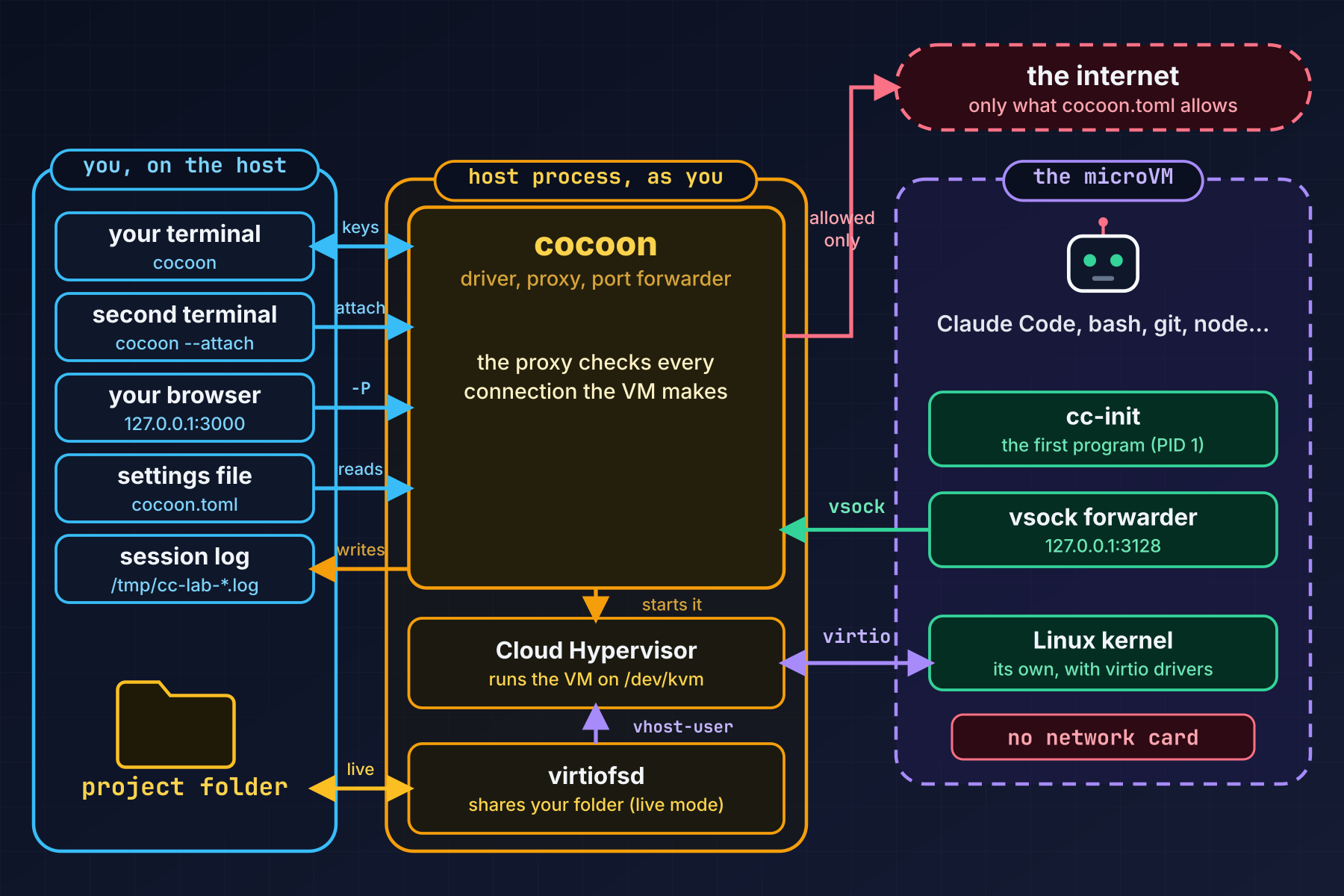
Three things to notice. Everything in the orange frame is an ordinary program running as you. The VM talks to the outside through exactly two links to cocoon: virtual hardware devices (disks, a console, the shared folder) and the vsock pipe for network traffic. And cocoon’s second job, besides running the VM, is the proxy, which is the only part that ever touches the internet.
Now zoom in. On the left is cocoon itself: one Rust program made of a dozen small files, each with one job. One handles the command line, one reads your settings, one unpacks the VM’s pieces from inside the binary, and one starts and watches the VM. That one in turn uses the rest: the disk builder, the proxy, the port forwarder, and the pieces that manage your terminal. Two more handle --attach and the review step in copy mode. On the host, cocoon runs two helpers, Cloud Hypervisor and virtiofsd, and borrows two standard Linux tools, mkfs.ext4 and debugfs, to build and read the VM’s disks without root.
On the right is the inside of the VM. After the kernel boots, it starts cc-init, which has a few small jobs of its own: finding the disks, serving extra shells, relaying forwarded ports, and applying window-size changes. When it is ready, it runs Claude Code on the console and starts the forwarder that carries network traffic out.
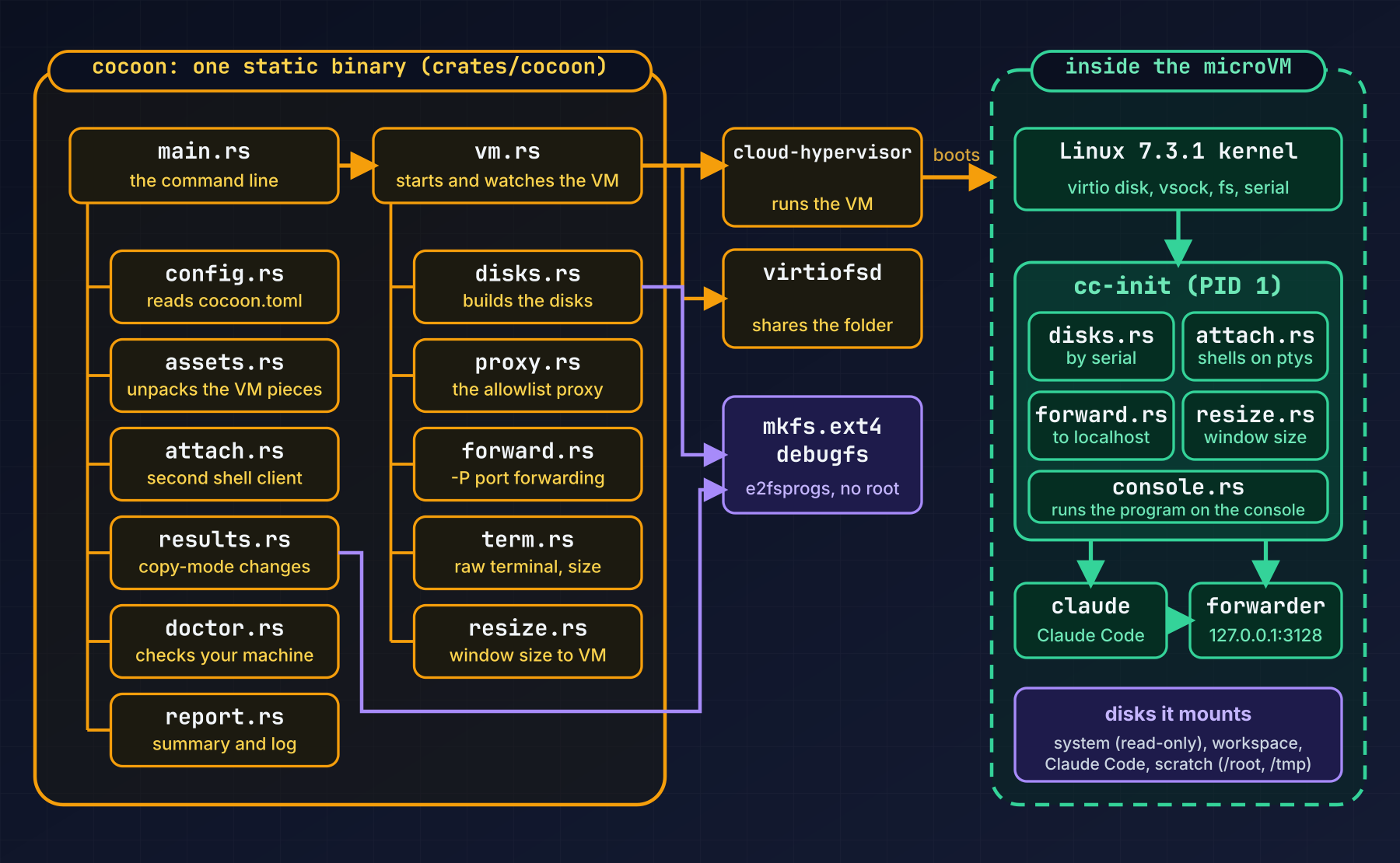
mkfs.ext4 -d, which copies a folder into a new ext4 disk as an ordinary user, and then fixes up each file’s owner and permissions with debugfs. Even the shared folder runs as you: its helper, virtiofsd, lives in its own user namespace where the VM’s “root” is just your user.cc-init directly. That is part of why it is fast.cc-init and the forwarder are small Rust programs with no dependencies on the system image. The whole thing, host side included, is Rust.A sandbox that oversells itself is worse than none, so here is the honest list.
The idea behind cocoon is small: give the agent a real computer of its own, with one door, and put you at the door. You can still be productive, and when something odd happens, it happens in a room you can throw away. 🦋
If you try it, run cocoon --doctor first. The troubleshooting guide in the repository covers the errors you are most likely to meet, and the usage guide has the config file and every switch.
cocoon is a small independent project, and there is plenty more I want to do with it: confine Cloud Hypervisor further, release an arm64 build, and keep up with new versions of Claude Code. That takes time, and funding is what buys me that time. If cocoon is useful to you, or you would like to see it get stronger faster, a coffee (the yellow button on this page) goes a long way, and I am genuinely grateful for it. ☕ Thank you for reading.
Point-in-time (19 November 2026): cocoon v0.0.1. Details such as the default allowlist and the size of the download will change between releases; check the repository for the current state.